



Managing your finances is now even easier.
A refreshed Digital Banking experience is here, designed to make everyday banking simpler, faster, and more intuitive. It features a modern design, simpler navigation, improved accessibility, and a more consistent experience across devices.
While the design looks a bit different, the Digital Banking tools you rely on every day didn’t change – they just became easier to find and use.
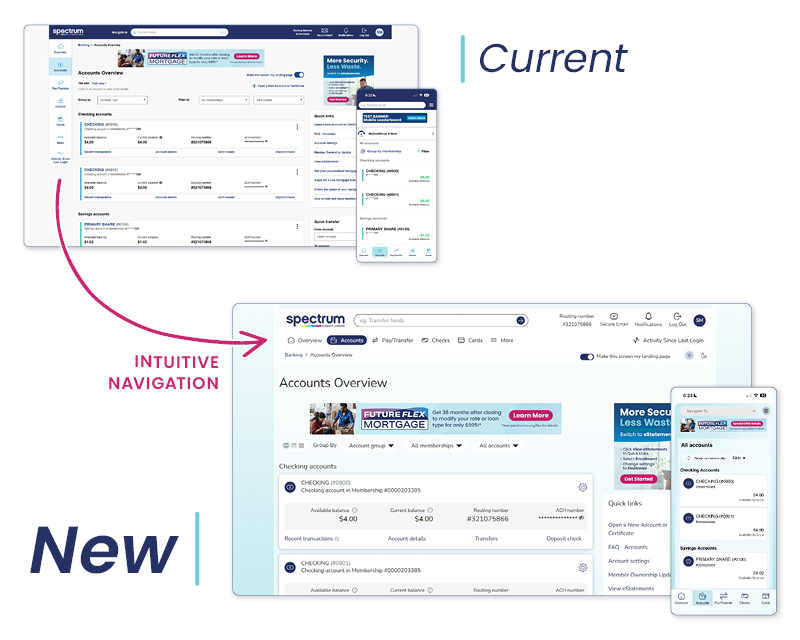
What's New
Modern Design
A cleaner, more streamlined design makes information easier to find, helping you complete everyday banking tasks with fewer clicks.
Light & Dark Modes
Choose the viewing experience that works best for you.
Mobile & Online Banking Consistency
Enjoy a more consistent experience whether you're banking from your computer, tablet, or phone.
More Intuitive Navigation
Simpler menus and better organization make it easier to find what you need.
Accessibility Improvements
Improved readability and accessibility make Digital Banking easier for everyone to use.
Faster Everyday Banking
Complete everyday banking tasks with fewer steps, so you can get back to your day faster.
What's Staying the Same
- Your Username and Password
- Your accounts and transaction history
- Zelle®, Bill Pay, Wires, and Statements
- Mobile Deposit and other everyday banking tools
Frequently Asked Questions
 Why did Digital Banking change?
We updated the experience to provide a more modern, intuitive, and accessible way to manage your finances.
Do I need to re-enroll?
No. Simply sign in with your existing Username and Password.
Were my accounts or transactions affected?
No. Your accounts, balances, transaction history, and settings all remain available.
Did any services change?
No. This update focused on improving how you use Digital Banking – not changing the services you rely on every day.
I have automatic app updates turned on. Do I need to do anything?
No. The app should have automatically updated on your device.
What if I don’t have automatic app updates turned on?
When you open the app, you'll be prompted to update to the latest version.
How can I check if I have the latest version of the app?
Visit the Apple App Store or Google Play Store and search for the Digital Banking app. If an Update button appears, a newer version is available. If you see an Open button, you're already using the latest version.
Zelle and the Zelle related marks are wholly owned by Early Warning Services, LLC and are used herein under license.
Apple and the App Store are registered trademarks of Apple Inc.
Google Play and the Google Play logo are trademarks of Google LLC.
Open a Checking Account
Are you a Spectrum member with an online banking account?
Spectrum checking accounts are available exclusively to our members, lorem ipsum dolor sit amet null erat rises placerat amet sit dolor erat lorem rises.

 Yes, I’m a Spectrum Member
 No, I don’t have an online banking account